How to collaborate on a video
with your team and your client
What video collaboration means
A video is rarely made by one person. Someone films, someone edits, someone signs off, and a client often has the last word. Video collaboration is everything that happens between those people: sharing the footage, sharing the cut, collecting notes and making the changes. The edit itself can be quick. The back and forth around it is where days go.
How video review usually works
Most teams still review by hand. The editor exports a file, uploads it somewhere and sends a link. The notes come back in an email, a chat thread or a voice message. "Around 0:40, the music is too loud." "Which version is this?" "See my message from Tuesday." The editor then hunts for the moment, guesses what was meant, exports again and starts over. Every round adds a file, and nobody is sure which one is the last.
Collaborative video editing for teams in Montage
In Montage, the team works in one workspace. You invite people by email, and everyone in the workspace sees the same videos and the footage that went into them, in one place. Nobody sends files to anyone.
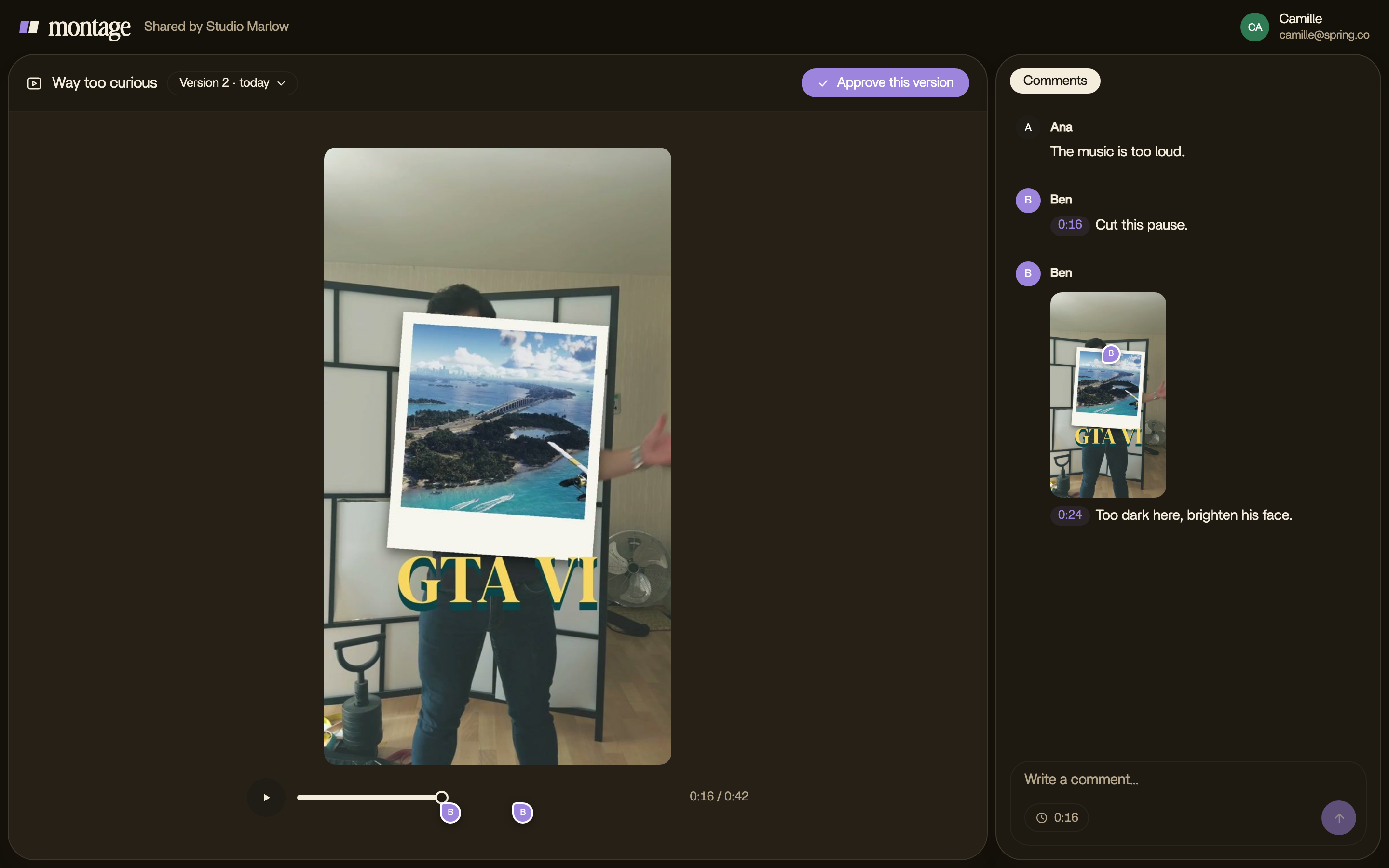
Every video keeps its versions. Each one you send to your client is dated, and they always know which version they are watching.
Inside the team, a comment that says @Montage goes straight to Montage, which makes the change and answers in Ask. When the notes are in, « Fix all » sends every waiting comment to Montage at once.
Video review and approval with your client
For someone outside the team, you invite them by email. Your client opens the link, watches, and leaves comments without creating an account: a name and an email are enough. The link opens that one video and nothing else. When the version is right, they press « Approve this version ».
A comment sits where it belongs: at its moment, and at a spot when the paused picture is clicked. The ones still waiting come first; once Montage has fixed them, they fold under « ✓ N fixed ». When a new version comes out, the notes stay on the version they were made on, and the new one starts clean.
Only the people of your workspace can ask @Montage for a change. A client's comment is a note for the team, not an order the app follows on its own.
Which plan you need
Comments come with every paid plan. Inviting your team to your workspace and getting feedback from anyone with a link come with Max and Ultra. On Max and Ultra, each person in the workspace, or each invitation waiting for an answer, is a seat. Credits are shared by the whole workspace.
Tips for faster video feedback
- Ask for notes on the moment, not in a message. A note on 0:42 needs no explaining.
- Press « Fix all » once the notes are in. What is still waiting is what is left to do.
- Keep one video and let its versions pile up inside it, instead of saving copies with new names.