Video review software:
7 tools, compared honestly.
Every video review tool collects your client's notes. Almost none of them asks who does the notes. Here are seven tools, what each one is for, and who should skip it.
 Ben, founder of Montage · · 9 min read
In this post9 parts
The short answer.
Let's start with the answer, because you've probably got a client waiting.
Video review software is where a client watches your video, comments on it and approves it, so the notes stop living in email threads. Here's the pick, in three lines:
- You edit in Premiere Pro all day? Get Frame.io. It sits inside Premiere.
- You need a sign-off in stages, legal then brand? Look at Filestage or Ziflow.
- You want the client's notes done, not just tracked? That's Montage, where the comments go to an AI editor.
One thing before we start: Montage is mine. I'll tell you when it's the wrong pick.
What video review software does.
So what does a video review tool actually do? Let me explain.
Pretty much every video review tool does the same five things. Brault's comparison of eleven tools (October 2026) lists them:
- Comments at an exact moment of the video, not « the part in the middle ».
- Drawing on the frame, to point at a spot.
- Versions, so everyone knows which cut is the current one.
- Filters on the comments: open, done, by person.
- A link for the client, with no account to create.
That last one matters more than it sounds. A client who has to sign up is a client who replies by email instead. In Montage, that's the client review links: the client opens a link, watches, comments and approves.
Writing a note that's easy to act on is its own skill. I wrote a whole guide on how to give video feedback that gets fixed. This one is about the tool.
How I compared them.
Here's the method. We read, in full, the pages that rank on Google for « video review software »: the comparison lists of Ziflow, Filestage, Brault and elevate.io, and ReviewStudio's own page. All four lists are written by a vendor that ranks itself first. So we kept only what the vendors say about themselves, and prices where two sources agree.
Prices are « from », per month, as checked by Filestage (July 2026) and Brault (October 2026). They change. Check the vendor's page before you buy.
For every tool, the same short block: what it's best for, and what to watch out for.
The best video review software, side by side.
Okay. Here are the seven, on one table. Look at the « Who makes the change » column.
| Best for | Client without an account | Approval | Who makes the change | Price from | |
|---|---|---|---|---|---|
| Frame.io | Editors in Premiere Pro and After Effects | Yes, by link | Yes | The editor, by hand | $15 per member; free for 2 members and 2 GB |
| Filestage | Approval in stages, many reviewers | Yes | Yes, in stages | The editor, by hand | About $199; free plan, one active project |
| Ziflow | Agencies with formal sign-off | Yes | Yes, in stages | The editor, by hand | $199 (Brault) |
| Wipster | Small teams, simple review | Yes | Yes | The editor, by hand | $9.95; no free plan |
| Vimeo Review | Teams already hosting on Vimeo | Yes | Yes | The editor, by hand | On paid Vimeo plans |
| Dropbox Replay | Teams already on Dropbox | Yes | Yes | The editor, by hand | $10 per user, on top of a paid Dropbox plan |
| Montage | Videos made in Montage, notes done for you | Yes, by link | Yes (« Approved v2 ») | Montage's AI editor | Max, $100 for teams |
Every tool here collects the notes. The question is who does them.
Each tool, in one block.
Frame.io
The one most editors know. Adobe bought it in 2021 for $1.275 billion (Brault), and it now works from inside Premiere Pro and After Effects: the client's comment shows up where the editor is already working.
- Best for: editors who live in Premiere Pro or After Effects.
- Watch out: the price is per member, so it climbs as the team grows.
Filestage
A review and approval platform for videos, but also documents and designs. Its strength is the approval itself: stages, reviewer groups, who signs off after whom.
- Best for: marketing teams with legal or brand sign-off on every video.
- Watch out: the paid plans start high, at about $199 a month.
Ziflow
Close to Filestage: proofing for agencies, with approval stages and reviewer groups. In its own list, Ziflow says plainly that it's Ziflow's product. Fair.
- Best for: agencies with a formal approval process for every client.
- Watch out: around $199 a month (Brault's figure), a lot for a small team.
Wipster
Simple video review: upload, share, comment, approve. No more, no less.
- Best for: small teams who just want the client's notes in one place.
- Watch out: a trial, but no free plan.
Vimeo Review
Review built into Vimeo: comments at a moment, on the video you already host there.
- Best for: teams whose videos already live on Vimeo.
- Watch out: the three sources don't agree on its price. It's part of paid Vimeo plans: check which one.
Dropbox Replay
Video review inside Dropbox, an add-on next to your files.
- Best for: teams whose footage already sits in Dropbox.
- Watch out: $10 per user a month, on top of a paid Dropbox plan.
Montage
Montage is our product, so read this one knowing that. It's a video editor where you say what you want and an AI editor does it. The client gets their own link, watches, comments at a moment or on a spot of the picture, and presses « Approve ». No account to create. Teams are on Montage's Max plan for teams, $100 a month.
- Best for: teams whose videos are made in Montage, who want the notes done, not just tracked.
- Watch out: Montage doesn't review a video edited somewhere else, and it has no sign-off in stages.
The question none of them answers: who makes the change?
Here's the thing: every list on Google compares how the notes are collected. Pinned to a frame. Turned into a task. Filtered. Approved. And then? A person still opens the editor, makes each change by hand, exports, and uploads the next version.
Even the closest one, elevate.io, puts the comments « on your editor's timeline ». Still, somebody has to jump in and make the edit. And Filestage's own FAQ says AI feedback is « an emerging area », with a human reviewer as the reliable option.
Sure. But what if the note was the fix?
That's the one thing Montage does differently. The client comments. Somebody on the team reads the notes, sends them on, and presses « Fix all ». The AI editor that does the comments makes every open change. Undo takes back its last one if it got one wrong. Then the next version goes to the client. Let's be clear: the AI works on the comments your team sends it, not on the client's alone.

So what kind of note gets done this way? The most common one there is: « fix the color ».
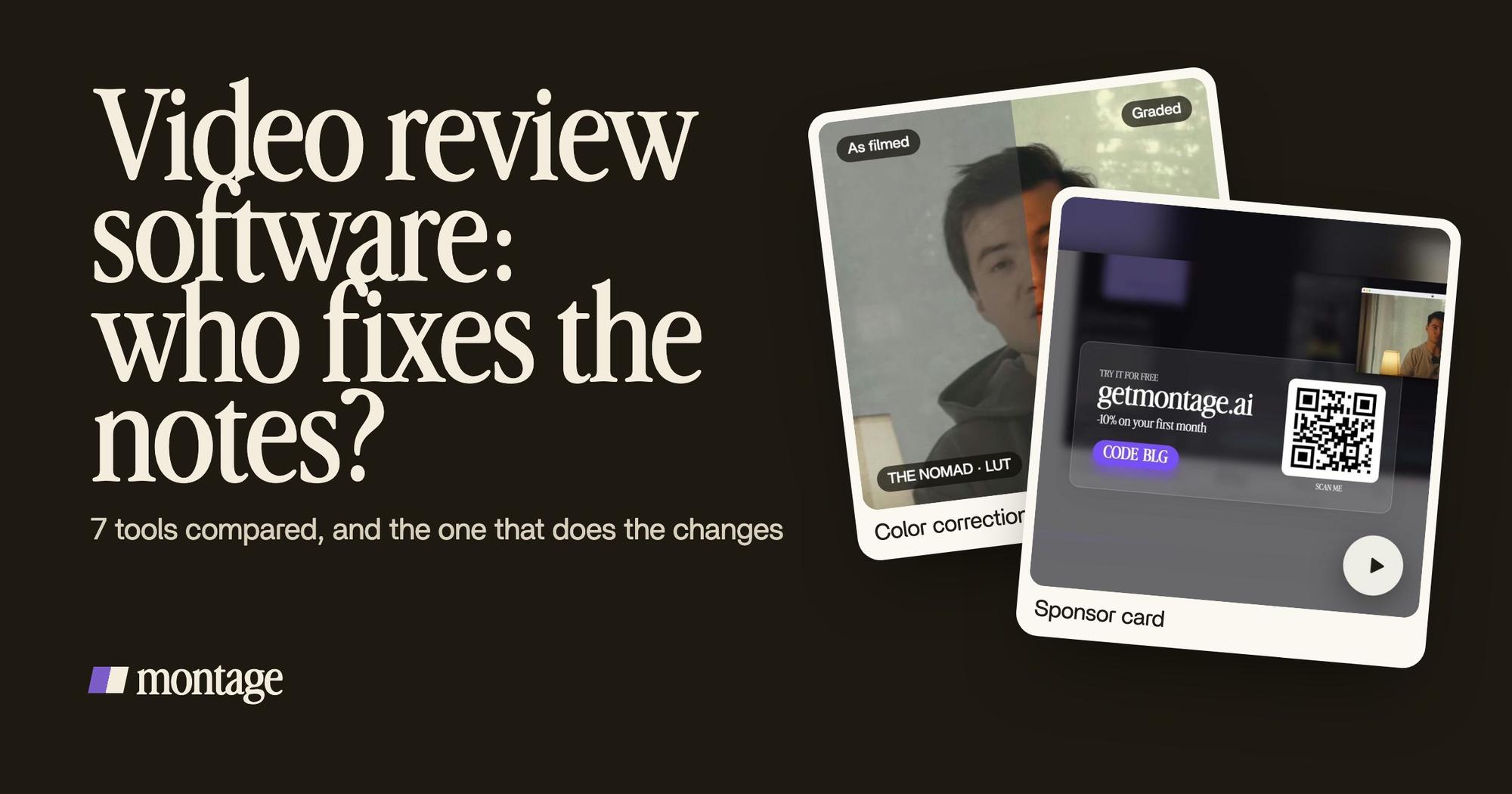
 Color correctionFilmed flat in HDR, the NOMAD LUT on every shot. Same frame, split.
 Color correctionFilmed too dark on an iPhone. I asked for a grade, no LUT: Montage lifted it on its own. Same frame, split.
The ad was filmed flat in HDR, the NOMAD LUT on every shot. The short was filmed too dark on an iPhone, graded with no LUT. A note like « this looks dark » ends there. You can watch the full ad to see it in motion.
And the kind of pieces a client signs off on, in a commercial video:
 Sponsor cardA component made for the sponsor: frosted glass, the QR code and the code BLG. Click to watch it.
 ComponentsThe hook: a white Instagram reply, made as a component and reused. Click to watch it on its own.
A sponsor card in frosted glass, with the QR code and the code BLG. An ad's hook, a white Instagram reply made as a component and reused. That's the work of ads made for clients: the notes are about details like these, and each one is a comment away.
Which version did they approve?
The other question every review tool answers, and one picture says it.
In Montage, the client presses « Approve », and the approval carries its version: « Approved v2 ». So when the client says « looks good », you know which cut they mean.
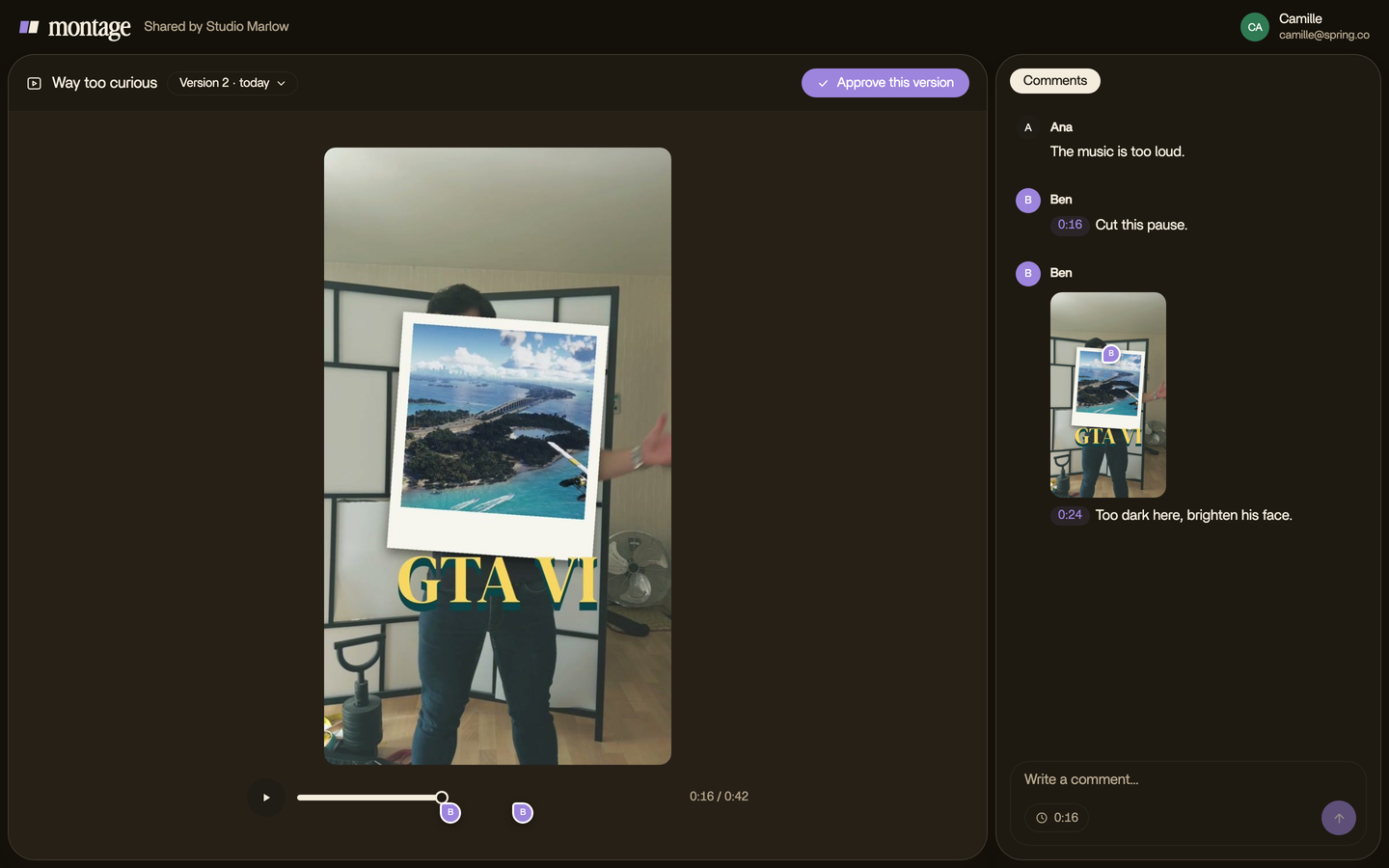
An approval without a version number is just a nice email.
How to choose.
So which one should you pick? Here's how I'd decide.
- You edit in Premiere Pro or After Effects. Honestly, get Frame.io. It's built into the tools you already use.
- Every video goes through legal, then brand, then the client. Filestage or Ziflow. Montage doesn't do sign-off in stages.
- You also review PDFs, banners and designs. Filestage or ReviewStudio. Montage only does video.
- You're a small team and want something simple. Wipster, or Vimeo Review if your videos are on Vimeo already.
- Your files live in Dropbox. Dropbox Replay, so nothing moves.
- You make the videos in Montage, and you're tired of doing the notes by hand. That's Montage.
And if you start in Montage and an editor wants to finish in their own tool? The cut exports for Premiere Pro or DaVinci Resolve.

Video review software: your questions.
What is video review software?
Video review software is a tool where a client or a team watches a video, comments on it at an exact moment, and
approves it. It keeps the notes and the versions in one place, instead of in email.
Is there free video review software?
Yes, with limits. Frame.io has a free tier for 2 members and 2 GB, and Filestage a free plan with one active project
(as checked by Brault and Filestage in 2026). Wipster has a trial, no free plan.
Can a client review a video without an account?
In most tools, yes: they get a link. In Montage, the client gets their own link, comments and approves, with no account
to create.
What's a good Frame.io alternative?
It depends on why you're leaving. For approval in stages, Filestage or Ziflow. For something simpler and cheaper,
Wipster. To have the notes done by an AI editor instead of by hand, Montage.
Can AI make the changes from the comments?
In Montage, yes: your team sends the comments to the AI editor with « Fix all », and it makes every open change. Undo
takes back its last one. In the other tools on this list, a person still makes the edit.
That's it for this one. Pick the tool that fits how you work, not the one with the longest feature list.
See you in the next one.