Video feedback:
how to give notes that get fixed.
A note is only useful if someone can act on it. Here's how to write one that gets fixed the first time, and what happens to it after you write it.
 Ben, founder of Montage · · 8 min read
In this post10 parts
- The short answer
- Video feedback, the effect (not this one)
- What makes a note useful
- How to give video feedback that gets fixed
- Positive feedback is a note too
- What happens after the comment
- Feedback from a client, with no account
- The five steps of a video feedback loop
- Video feedback: your questions
- See it in real videos
The short answer.
Let's start with the answer.
Video feedback is the notes someone gives on a video: what to change, what to keep, and where. A good note names four things. The moment. The spot on the picture. What's wrong. What you want instead. Do that, and the person editing can fix it without asking you a single question.
That's it. The rest of this guide is how to do it well, with a client, and in fewer rounds.
If you work with a team or with clients, this is the part of the job that eats the most time. Notes in an email thread. A spreadsheet of timecodes. « At 1:12, the thing. » Here's how I'd do it instead, and how comments and client links in Montage work.
Video feedback, the effect (not this one).
Quick detour, because the same two words mean something else too.
Video feedback is also a visual effect: the one « produced when a video camera is directed at a video monitor displaying the camera's live output » (Wikipedia). The picture loops into itself, again and again, into tunnels and spirals. The BBC used it for the Doctor Who titles from 1963 to 1973, and Queen's « Bohemian Rhapsody » video (1975) was made with it, in camera (Wikipedia, « Video feedback »).
A beautiful effect. But that's not this article. Back to notes.
What makes a note useful.
So what makes a note useful? Let me explain.
Honestly, « make it pop » is not feedback. It's a feeling. The person editing has to guess what you meant, try something, send it back, and wait. Then you say « not quite ». Another round.
A note is only feedback when someone can act on it.
A note that gets fixed has four parts:
- Where: the moment in the video, and if it matters, the spot on the picture. Not « the intro », but this second, this corner.
- What's wrong: what you see or hear. « Too dark. » « Upside down. » « The music covers my voice. »
- What you want: the result, said plainly. « A grade, no LUT. » « The right way up. »
- What to keep: what's working. More on that below.
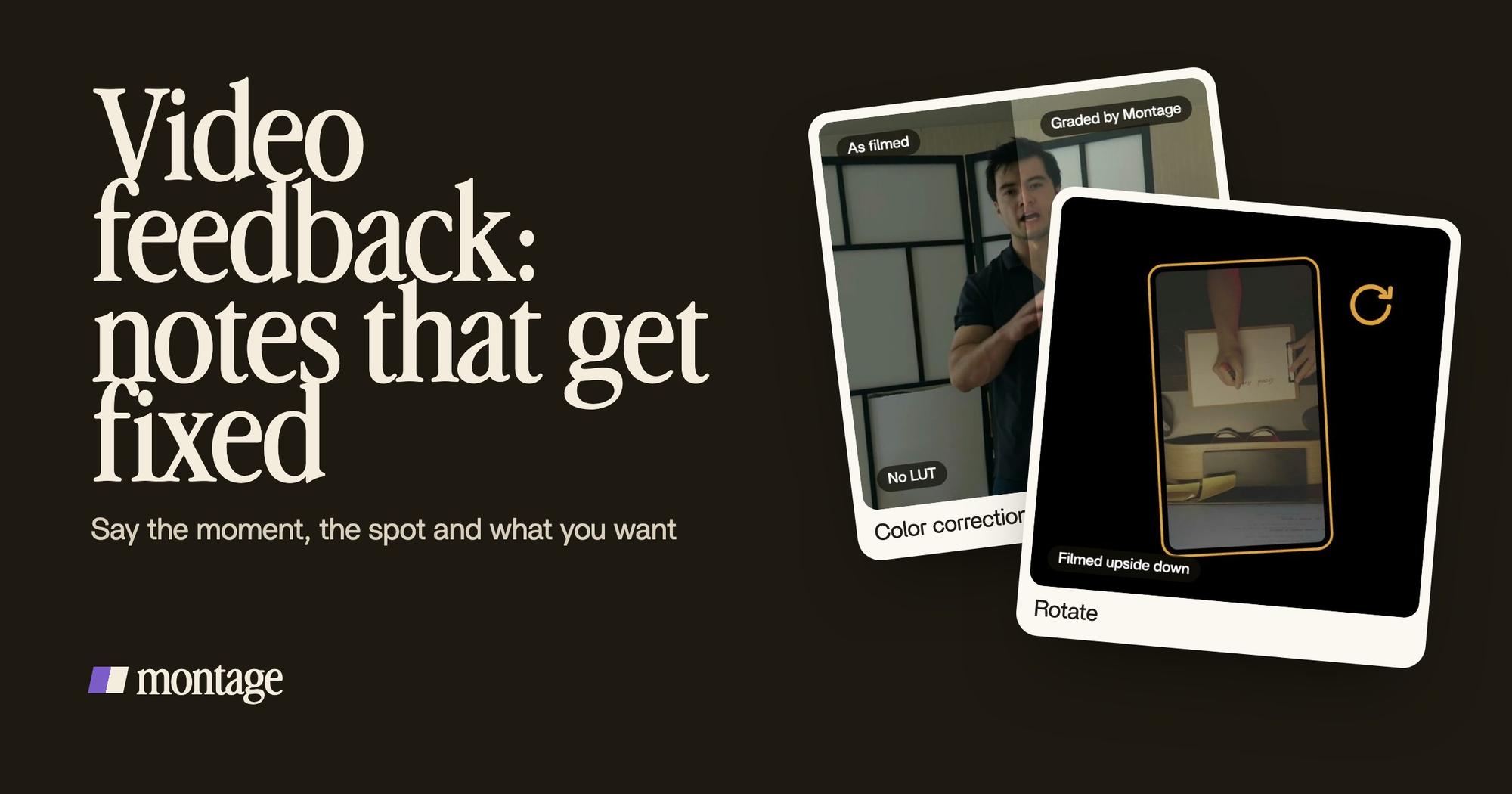
Here's what that sounds like on real videos. Way too curious was filmed too dark on an iPhone. I asked for a grade, no LUT. In How to be creative, the notebook shots were filmed from above, upside down, and Montage turned them the right way up. A note like either of those is all it takes: what's wrong, and what to do.
 Color correctionFilmed too dark on an iPhone. I asked for a grade, no LUT: Montage lifted it on its own. Same frame, split.
 RotateThe notebook shots were filmed from above, upside down. Montage turned them the right way up.
Same frame, split: before on the left, after on the right. More on grading footage that's too dark, or watch the full Way too curious video.
How to give video feedback that gets fixed.
Okay. Let's put vague notes next to precise ones.
| Vague note | Precise note |
|---|---|
| « Make it pop. » | « At 0:04, the shot is too dark. Lift it, no LUT. » |
| « Fix the colors. » | « Takes 4 to 7 look grey. Put the same LUT on each. » |
| « The captions are off. » | « Yellow, uppercase, a blue drop shadow, and the key word bigger. » |
| « Something's weird here. » | « These shots are upside down. Turn them the right way up. » |
| « Too long. » | « Cut the pause after "so", here. » |
| « I don't love the text. » | « One line at a time: white on the take, dark on the white stage. » |
Do you see the difference? The left column starts a conversation. The right column ends one.
Captions are the best example. « The captions are off » could mean the font, the color, the timing, the size. A precise note just says the look you want, like these two:
 CaptionsYellow, uppercase, a blue drop shadow, and the key word drawn bigger.
 CaptionsOne line at a time, white on the take, dark on the white stage.
A few habits that help:
- One note, one thing. Put three changes in one comment, and one of them tends to get lost.
- Watch it all the way through first. Then go back and comment. Your first reaction to second 10 changes once you've seen second 50.
- Point, don't describe. « Here » on the picture beats « the top left, near the logo, kind of ».
- Say what you want, not how to do it. « Brighter » is your job. Which slider is the editor's.
Positive feedback is a note too.
Now, here's the thing: « keep this » is feedback. And it's the note people forget.
When you only list what's wrong, the next version can lose what was right. The person editing doesn't know the zoom on « curious » is your favourite moment. So they change it.
Examples of positive feedback on a video:
- « The cut at 0:12 is perfect. Keep that rhythm everywhere. »
- « Love the captions. Same style on the next one. »
- « This B-roll is exactly right. More like this. »
Say what to keep, or you might lose it.
It works because an edit is a series of decisions, and a « keep » tells the editor which decisions were right. I wrote about the decisions every edit makes in the beginner's guide.
What happens after the comment.
Most video feedback tools stop at the comment. You leave a time-stamped note, maybe on a precise frame, all in one place instead of a doc or a spreadsheet (Vimeo's guide to video feedback tools says exactly that). Good. But then someone still has to read every note and make every change by hand.
In Montage, the comment is the instruction. You pause, click on the picture or pick the moment, and write what's wrong. Then you press « Fix all », and the AI editor makes the changes. Don't like one? Undo takes back Montage's last change.

That's the whole idea: an AI editor that reads your comments. Watch. Comment. Done.
If you're comparing tools for this, I put them side by side in video review software, compared.
Feedback from a client, with no account.
Let's be clear: the hardest reviewer is the client. They're busy, they don't want a new account, and three weeks later nobody remembers which version they said yes to.
On Vimeo, for example, a reviewer has to « log in and open the file » to comment (Vimeo's FAQ). In Montage, the client gets a link. No account. They watch, comment on the video the same way you do, and press « Approve ». The approval is tied to the version: « Approved v2 ». So the question « which one did they approve? » has an answer.
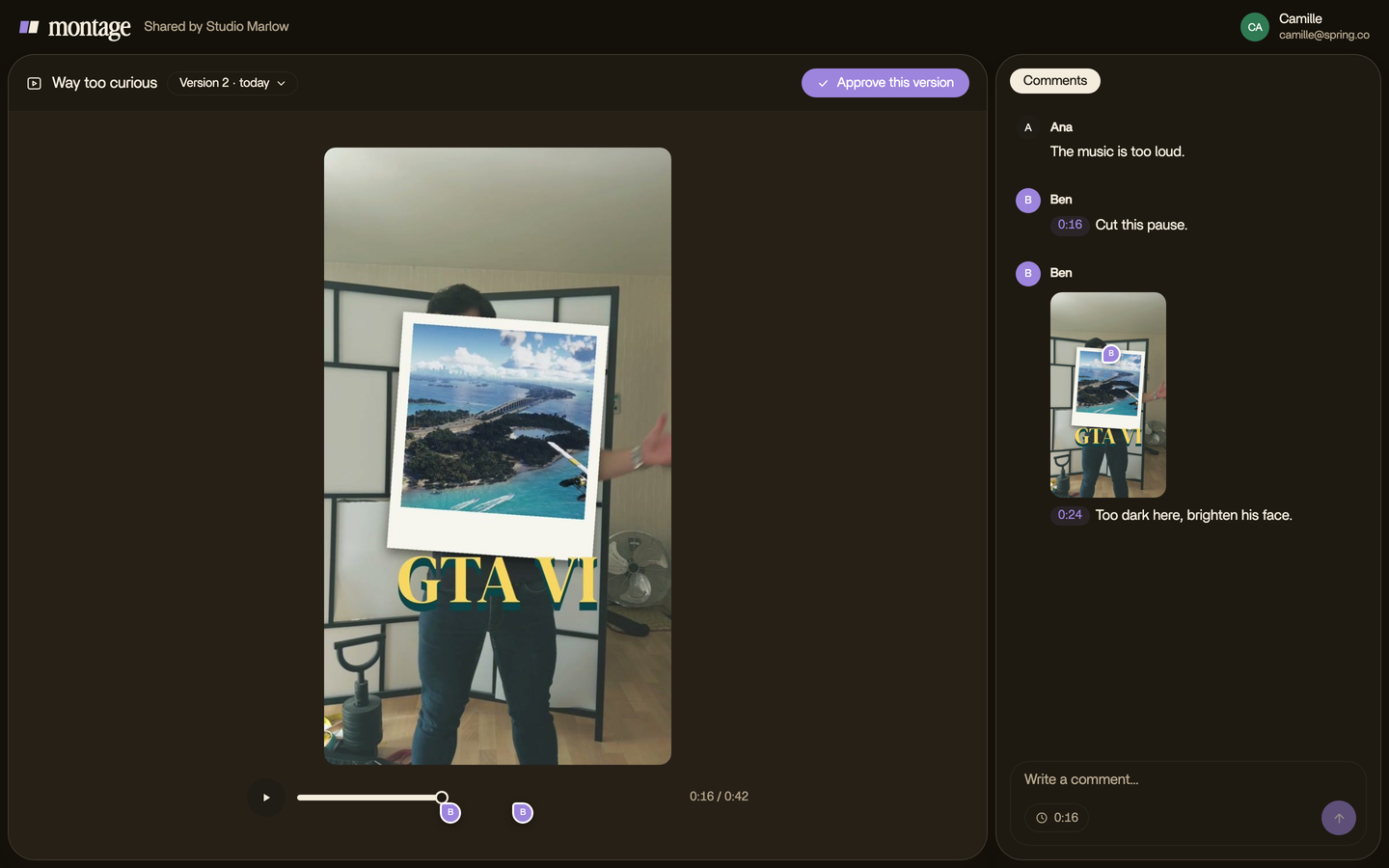
Teams work together in Montage on the Max and Ultra plans (from $100 a month).
The five steps of a video feedback loop.
You'll hear « feedback loop » a lot. Here's how I see it for video. Not a standard, just the five steps every round goes through:
- Watch. All the way through, once.
- Comment. At the moment, on the spot, what's wrong, what you want, what to keep.
- Fix. Every note, at once.
- Send the new version. To the team or the client.
- Approve. Or go back to step 1, with fewer notes this time.
In Montage, the round itself comes down to three:
Good notes make the loop short. Vague notes make it go round and round.
Video feedback: your questions.
What is video feedback?
Usually, the notes someone gives on a video: what to change, what to keep, and where. It's also the name of a visual
effect, made by pointing a camera at a screen showing its own live picture (Wikipedia).
How do I comment on a video so it gets fixed?
Name the moment, the spot on the picture if it matters, what's wrong and what you want. One thing per note. And say what
to keep.
What are examples of positive feedback on a video?
« The cut at 0:12 is perfect, keep that rhythm. » « Same caption style on the next one. » « More B-roll like this. » A
good « keep » is as precise as a good « change ».
What are the 5 steps of a video feedback loop?
Watch, comment, fix, send the new version, approve. Then start again if there's more to change.
Does my client need an account?
Not in Montage. The client gets a link, watches, comments and approves, with no account.
Is video feedback used in schools too?
Yes. Teachers record students in role-plays or simulations, then review the recording with them (Noldus, on video
feedback in education). Same idea: watch it back, then talk about what to change.
See it in real videos.
Every card in this guide comes from a real video. The four videos in the showcase show what went in and what came out.
 9:18
 2:07
 0:56
 0:38
That's it for this one. Now go write a note someone can act on.
See you in the next one.