Faceless YouTube channel:
how to start one.
You'd make videos if you didn't have to be on camera. Good news: you don't. Here's what a faceless channel really takes, and what fills the screen when you're not on it.
 Ben, founder of Montage · · 9 min read
In this post10 parts
- The short answer
- The kinds of faceless channel
- What fills the screen when your face isn't there
- The voice is the face
- How to make a faceless YouTube video, step by step
- A style, not a template
- Does YouTube allow a faceless YouTube channel to make money?
- Picking your niche
- Questions about faceless YouTube channels
- See it in real videos
The short answer.
Let's start with the answer.
A faceless YouTube channel is a channel where the creator never appears on camera. The story is carried by a voice, and by what's on screen while it talks: clips, pictures, headlines, animation, screen recordings, gameplay, or just your hands. That's the definition vidIQ and Metricool both give, and it's the right one.
Starting one comes down to three things. Pick a niche you can talk about for a hundred videos. Find a look you'll keep. Then make each video: your voice first, the pictures on top of it. If you want the bigger picture on making faceless videos, start there. This one is about the channel.
Now, here's the thing: most guides on this tell you to use stock footage and an AI voice. I think that's the fastest way to build a channel YouTube won't pay. Let me explain why, and what to do instead.
The kinds of faceless channel.
So what does a faceless channel actually look like? Epidemic Sound splits them in two, and I think it's a useful split.
| Traditional | Automated | |
|---|---|---|
| The voice | Yours | Often an AI voice |
| The pictures | Your hands, your shots, your screen, real clips | Stock footage, AI clips |
| Who makes it | You | A tool, or someone you pay |
| Examples | Kurzgesagt, Cooking Haru (vidIQ) | Channels built on stock footage and an AI voice |
| What it costs you | Time per video | Less time, more risk on the money |
Sure, the automated kind works in some niches. Ambient music, sleep sounds, a looping scene: nobody needs a narrator for that. Some of the biggest faceless channels barely talk at all: Lofi Girl is continuous music in one animated world (vidIQ), and Epidemic Sound puts it at around 15 million subscribers.
But for everybody else? If your channel explains, tells stories or teaches, the second column is where the trouble starts. Epidemic Sound says it too: viewers may grow tired of stock images.
What fills the screen when your face isn't there.
This is the part nobody shows. Every guide says « add visuals », and stops. So let me show you, second by second, with real videos.
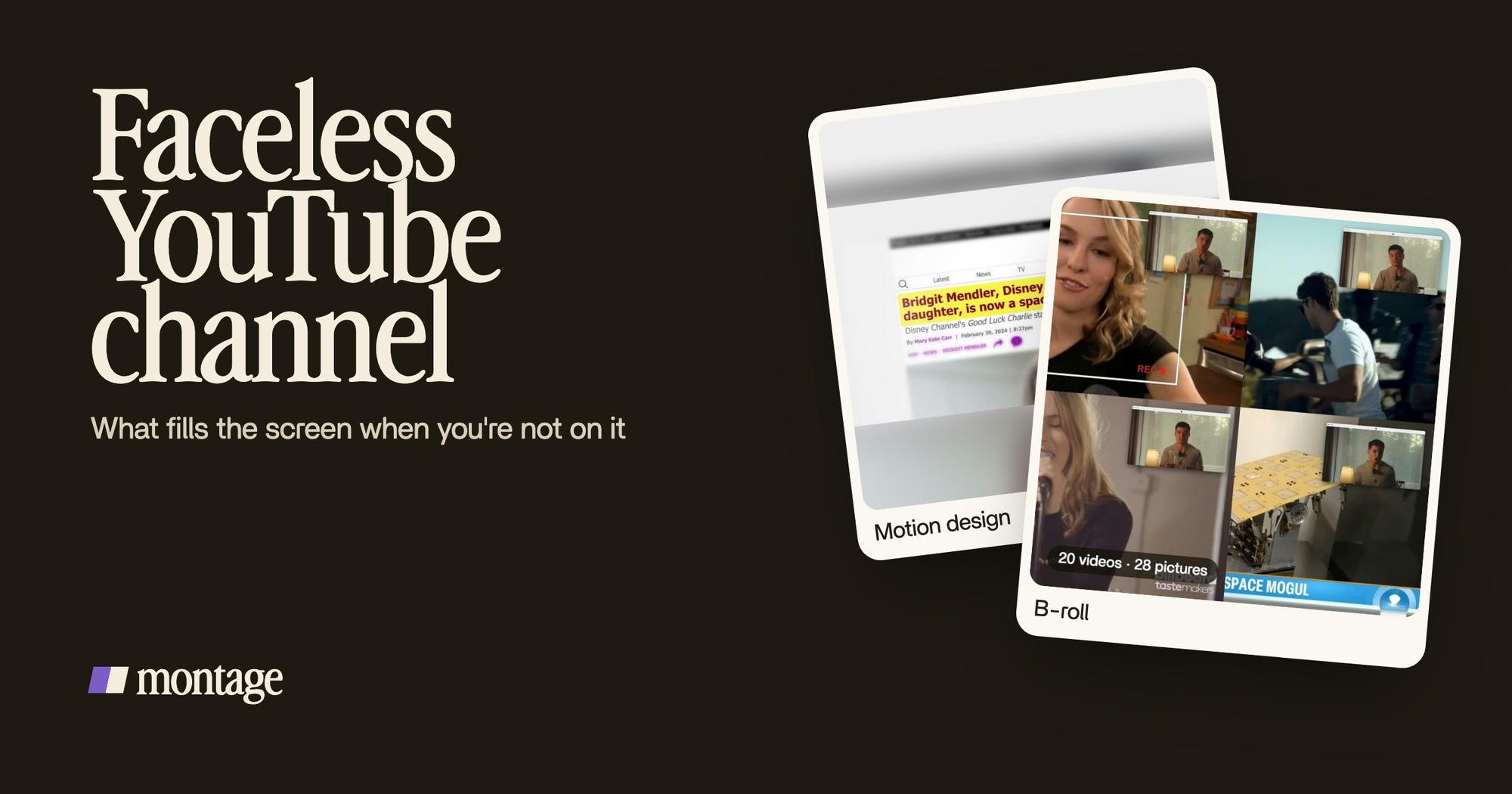
Let's be clear first: the four videos in the showcase have me in them. They're not faceless channels. But look at From Disney star to space CEO: 9 minutes and 18 seconds, 216 cuts, and most of the time my face is a small window. What carries the screen is exactly what a faceless documentary is made of.
 B-rollGood Luck Charlie, Ready or Not, Billboard, the TODAY antenna: the face cam moves to the corner while each plays.
 Motion designA real headline, highlighted in yellow while I read it. Click to watch it.
 Animated textThe article tilts in and a red marker underlines the number. Click to watch it.
Here's the map:
- Real clips of the subject. Good Luck Charlie, Ready or Not, Billboard, the TODAY antenna: each one plays while my face cam moves to the corner and the story goes on. That's B-roll placed on your words.
- Headlines and text. A real headline, highlighted in yellow while it's read. An article that tilts in, a red marker under the number. Those are animated headlines and text, and they do the job a face would: they tell you where to look.
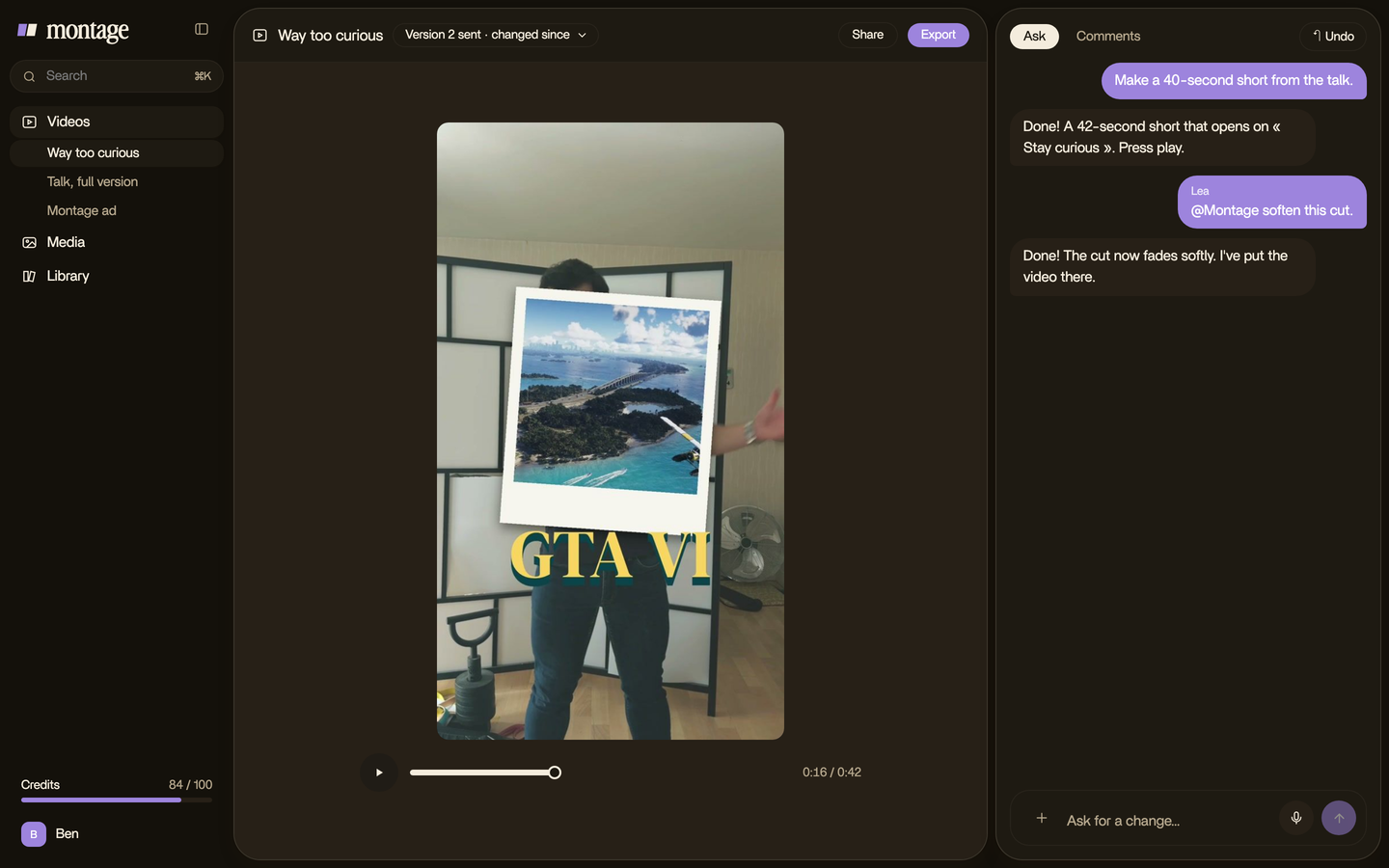
- Pictures that drop in. In Way too curious, I say CrossFit, my photo drops in. One picture for each thing.
- Your own shots of hands and objects. In How to be creative, it cuts to the book, the notebook, the whiteboard while the voice keeps going. You can film all of that without ever showing your face.
Take the face out of those videos, and the screen still has something to show on every line. That's the test for a faceless video.
If you can't say what's on screen for every sentence, the video isn't ready.
The voice is the face.
Most ranking guides treat the voice as a step. Write a script, run it through an AI voice, done.
To be honest, I think that's backwards. In a faceless video, the voice is the only person in the room. It's the spine, and everything on screen hangs on it. In Edit it all with AI, the site drops in the moment I say « go to this app called Montage ». In Way too curious, every photo lands on its word.
No face, so the voice does the work of one.
So here's my advice: record your own voice. Then tell your editor « when I say X, show X ». Whether that editor is a person, a timeline, or Montage, that one sentence is the whole method.
And captions? A lot of people watch with the sound off. On a video that's only a voice, the captions are what they see first, so give them a look of their own.
 Captions
More on captions in your own style.
How to make a faceless YouTube video, step by step.
Here's how I'd make each video today.
- Write what you'll say. Your words. Montage doesn't write the script, and in my opinion your words are the one thing nobody should write for you.
- Record your voice. A quiet room, the phone close. Say each line twice. You'll keep the best take.
- Gather what you'll show. Clips you have the right to use, pictures, screen recordings, a few minutes of your hands and the objects you'll mention.
- Drop it all in. The voice recording, the clips, the pictures. As they are.
- Say where each picture goes. « When I say Billboard, show the Billboard clip. Highlight the headline while I read it. Captions in yellow. »
- Watch it once, then comment. Pause where it's off, point at it, fix everything at once.
- Export, and post it yourself.
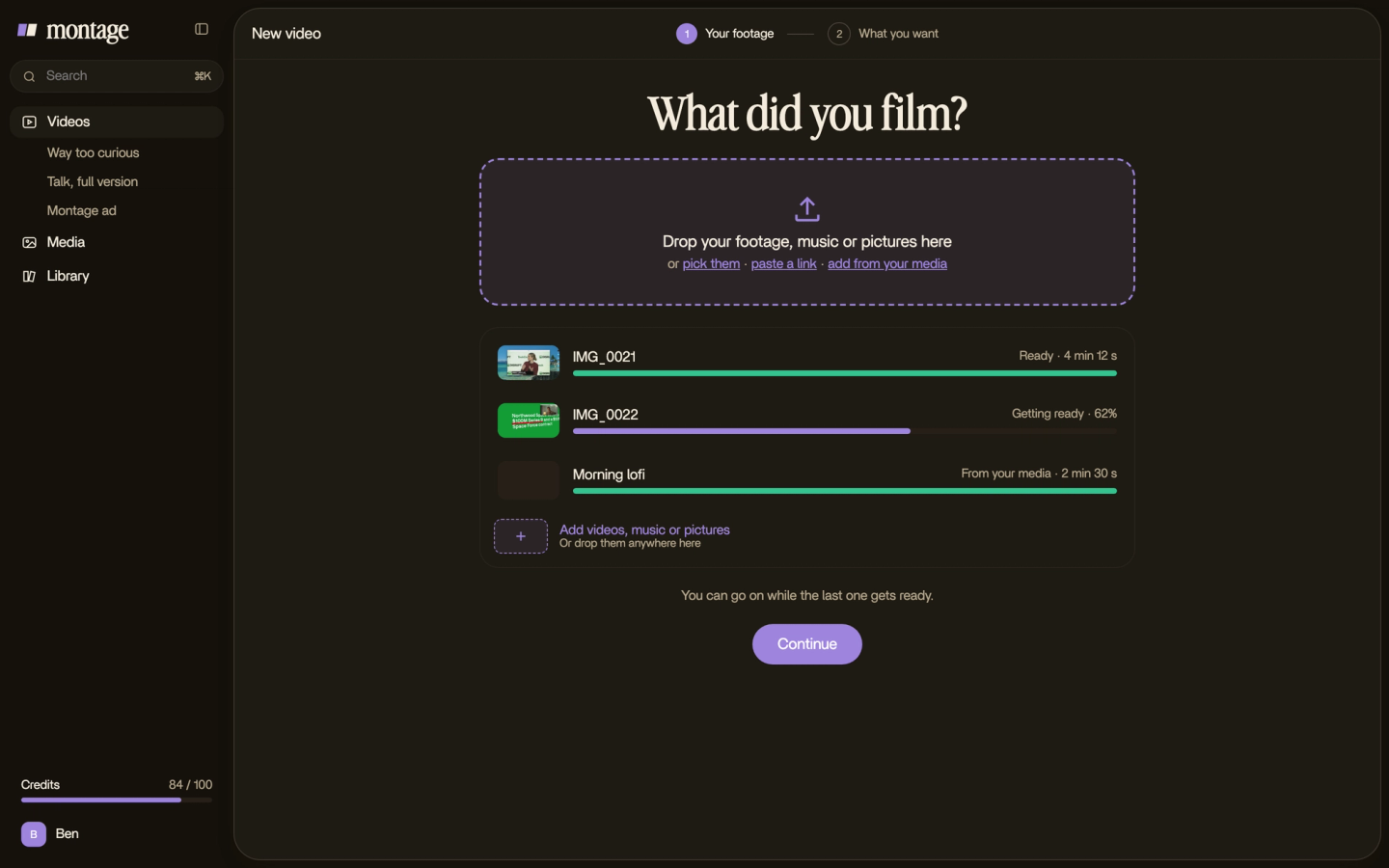
Now, let's be clear about what Montage does here. It edits what you give it: your voice, your clips, your pictures, your screen recordings. It doesn't write the script, it doesn't generate a voice or an avatar, it doesn't make a video from nothing, it doesn't take a YouTube link, and it doesn't post to YouTube. If you want a channel that runs itself every day, tools like faceless.video and faceless.so sell exactly that. Montage isn't for you, and that's fine.
A style, not a template.
Here's the thing a faceless channel needs: a look people recognise. Kurzgesagt is the example vidIQ gives. You know it's them before you hear a word.
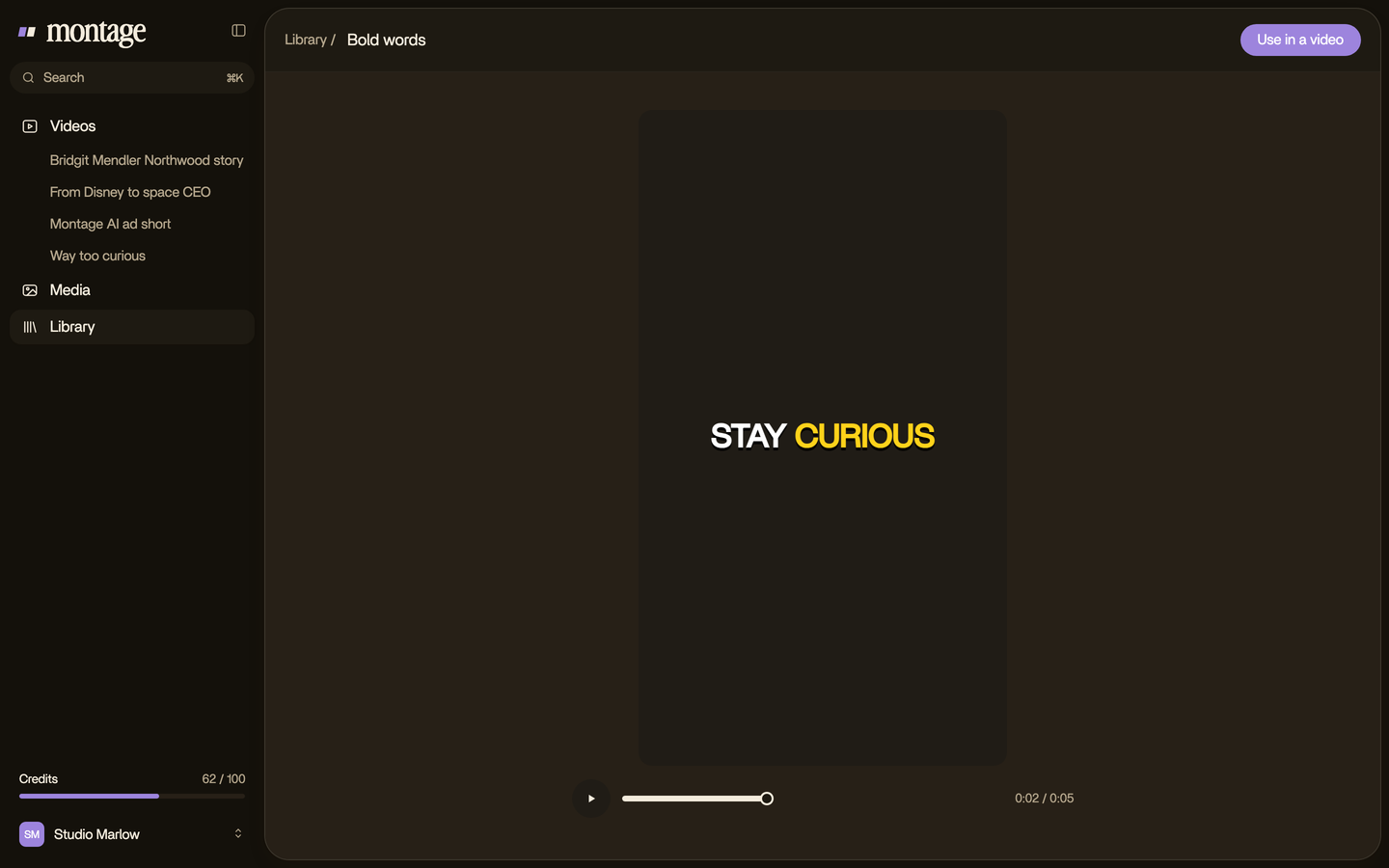
That look is made once and reused. In From Disney star to space CEO, one media card is used 26 times: a picture or a clip, its caption, on the dark page. In Way too curious, the Photo drop is a component Montage made from my words, and it comes back every time I name something.
 Reusable componentsOne media card, used 26 times: a picture or a clip, its caption, on the dark page. Click to watch it.
 ComponentsThe Photo drop is a component Montage made from my words: I say GTA VI, it drops in.
 B-rollWhile I talk, it cuts to the right shot: the book, the notebook, the whiteboard.
Build those pieces once, keep them, and every new video starts with the channel's look already there. That's what reusable components for YouTube are for.
But notice the difference. Same look, new story every time: that's a channel. Same video, new words: that's what YouTube stops paying for. Which brings us to money.
Does YouTube allow a faceless YouTube channel to make money?
Yes. YouTube doesn't ask to see your face. vidIQ puts it in one line: being faceless isn't the issue for monetization. Originality is.
Here are the rules, as vidIQ and Metricool both reported them in August 2026:
| To earn from ads today | From February 1, 2027 | |
|---|---|---|
| Subscribers | 1,000 | 1,000 |
| Long videos | 4,000 public watch hours in 12 months | 8,000 public watch hours in 12 months |
| Or Shorts | 10 million Shorts views in 90 days | 20 million Shorts views in 90 days |
And the rule that matters more. In mid-2026 YouTube made it clear, Metricool reports, that generic and repetitive content, mass-produced off one template with minor changes, doesn't earn ad money. Using AI to help is allowed. Making the same video a hundred times isn't.
Honestly, a channel that runs itself is the one YouTube stops paying.
One more number, so you know what you're walking into: Metricool's 2026 YouTube Study, across 799,718 videos, estimates the ad revenue per long video fell from $2.65 to $1.20. I'll go deeper on whether faceless channels make money in its own article.
Picking your niche.
Pick a subject you could make a hundred videos about, where the pictures exist or you can film them. History, science, money, stories, cooking with your hands, a game you know by heart. vidIQ lists 40 of them with real channels behind each.
I won't list them all here. You'll find my faceless channel ideas in their own article.
Questions about faceless YouTube channels.
What is a faceless YouTube channel?
A channel where the creator never appears on camera. A voice tells the story, and clips, pictures, text, animation,
screen recordings or your hands fill the screen.
Do faceless YouTube channels earn money?
They can. YouTube pays faceless channels like any other once they reach its thresholds (1,000 subscribers and 4,000
watch hours, or 10 million Shorts views in 90 days, per vidIQ and Metricool). What it won't pay for is generic,
repetitive content.
How many views do I need to make $10,000 a month on YouTube?
It depends on your niche. What an advertiser pays per thousand views changes a lot from one subject to the next, so
any single number would be a guess. The money article goes through it.
Who is the most famous faceless YouTuber?
Lofi Girl is one of the biggest, at around 15 million subscribers (Epidemic Sound). Kurzgesagt is the classic example
of a faceless channel built on a style (vidIQ).
Does YouTube allow faceless channels?
Yes. There's no rule about showing your face. The rule is about originality: your own story, your own look, not the same
video with the words swapped.
Can I start a faceless YouTube channel with AI?
Yes, AI can help you edit. But keep your own words and, I think, your own voice. That's what makes the channel yours.
See it in real videos.
Every part in this article comes from a real video, each one asked for in a sentence. The four real videos show what went in and how each one was made.
 9:18
 2:07
 0:56
 0:38
That's it for this one. Record your voice, and the rest follows.
See you in the next one.