The best laptop for video editing YouTube:
buy it for the way you edit.
Every guide picks a laptop for one way of editing. Before you spend a lot on one, ask the question that comes first: how will you edit?
 Ben, founder of Montage · · 10 min read
In this post11 parts
- The short answer
- How I picked
- First, how will you edit?
- The best laptops for video editing YouTube in a timeline program
- The specs that matter
- If you edit in the browser
- A real YouTube video, start to finish
- Side by side
- Which one is for you?
- Questions about the best laptop for video editing YouTube
- See it in real videos
The short answer.
Ladies and gentlemen, let's start with the answer, because that's what you came for.
The best laptop for video editing YouTube videos, according to the two labs that test them, is a MacBook Pro. RTINGS picks the Apple MacBook Pro 16 (M5, 2026). Digital Camera World picks the Apple MacBook Pro 14 (M5 Max). On a budget, both labs pick the same machine: the ASUS TUF A16.
Now, here's the thing. Those picks are made for one way of editing: a timeline program, like Adobe Premiere Pro or DaVinci Resolve, playing and cutting your footage on the laptop itself. If that's how you'll edit, buy what the labs say. If it isn't, their list answers a different question.
Don't buy a laptop for video editing. Buy it for the way you edit.
So before the list, one question. And if you're still learning the edit itself, start with how to edit a YouTube video, step by step.
How I picked.
Let's be clear: I didn't test any laptop for this article.
These picks come from the guides Google ranks for this search, read in full and compared. Two of them measure what they recommend. RTINGS says it bought and tested 186 laptops, with a colorimeter and benchmark suites. Digital Camera World (last updated 15 August 2026) tests with a monitor calibrator and Geekbench. Where they agree, I say so. Where only one says it, I name which one.
Shotkit is the only guide written for YouTube, but its models are years old. I use its spec advice, not its picks.
No laptop price is given here. They move every day. Check them yourself.
First, how will you edit?
So which laptop should you buy? Let me ask you something first. How will you edit?
There are two routes today.
- In a timeline program (Premiere Pro, DaVinci Resolve, CapCut). The laptop plays every clip, renders every effect, and exports the file. It does the heavy lifting, so the guides' advice holds: RAM, a graphics card, power that lasts through a long export.
- By asking, in the browser (Montage). You drop the footage, say what you want, watch the result and comment on what's wrong. Your job changes: you're not placing clips, you're watching and judging on the laptop's screen.
Shotkit comes closest to this. It tells you to check the minimum specs of your editing software before you buy a laptop. Truth is, that's the right order. Pick the editing software first, then the machine.
The best laptops for video editing YouTube in a timeline program.
If you'll edit in Premiere Pro or Resolve, here are the picks. Same block for each.
Apple MacBook Pro (16-inch M5, or 14-inch M5 Max)
- What it is: the best pick of both labs. RTINGS picks the 16-inch with the M5 (2026), M5 Pro or M5 Max, and says it leaves « plenty of room for your timeline ». Digital Camera World picks the 14-inch with the M5 Max as best overall.
- Best for: editing every day, long videos, 4K, color work.
- Not for: a tight budget.
- Watch out: RTINGS notes the RAM and the SSD can't be replaced. Buy what you need up front.
Apple MacBook Air (M5, 13 or 15 inch)
- What it is: RTINGS' ultraportable pick. It recommends the 15-inch « for your timeline and preview window », and 24GB or 32GB of RAM if you edit regularly.
- Best for: shorts and lighter edits, on the go.
- Not for: long exports. RTINGS says it's fanless, which limits sustained performance.
HP OMEN Transcend 14 (2024)
- What it is: RTINGS' mid-range pick, on Windows. RTINGS recommends 32GB, because the memory is soldered. It also says plainly that it tested an older configuration.
- Best for: a Windows machine that can edit and play games.
- Not for: anyone who wants a big screen for the timeline.
ASUS TUF A16
- What it is: the budget pick of both labs. RTINGS tested the ASUS TUF Gaming A16 Advantage Edition (2023), and notes its RAM and storage can be upgraded later.
- Best for: starting on a budget, and upgrading as the channel grows.
- Not for: quiet rooms. RTINGS says it gets hot and loud under load.
Asus ProArt P16
- What it is: Digital Camera World's best Windows laptop for video editing.
- Best for: editors who want Windows and a lab's top Windows pick.
- Not for: anyone set on a Mac.
RTINGS also names Windows alternatives: the Dell Alienware 18 Area-51, the Lenovo Yoga Pro 9i 16, the Lenovo ThinkPad X9 15 Aura and the Acer Swift Go 14.
The specs that matter.
Okay. Whatever you buy, here's what the guides agree on.
- RAM: Shotkit says 8GB is enough for basic editing, 16GB to 32GB for large projects. RTINGS says 24GB or 32GB on a MacBook Air if you edit regularly.
- Storage: Digital Camera World calls 512GB a bare minimum for 4K video, and 1TB preferable. Footage adds up fast, more on that in filming the video in the first place.
- Screen: Digital Camera World says at least 15 inches, IPS or OLED, and pre-calibrated if you can.
- Graphics card: Digital Camera World says a mid-range one will do fine.
- Upgrades: on a MacBook, RTINGS says RAM and SSD can't be changed later. On the ASUS TUF A16, they can.
What you can't upgrade, you buy on day one.
If you edit in the browser.
Now, the other route. Montage runs in your browser. You drop your takes in as they come off your phone, and the originals stay on your computer. No sorting first: here's how footage dropped straight off your phone works.
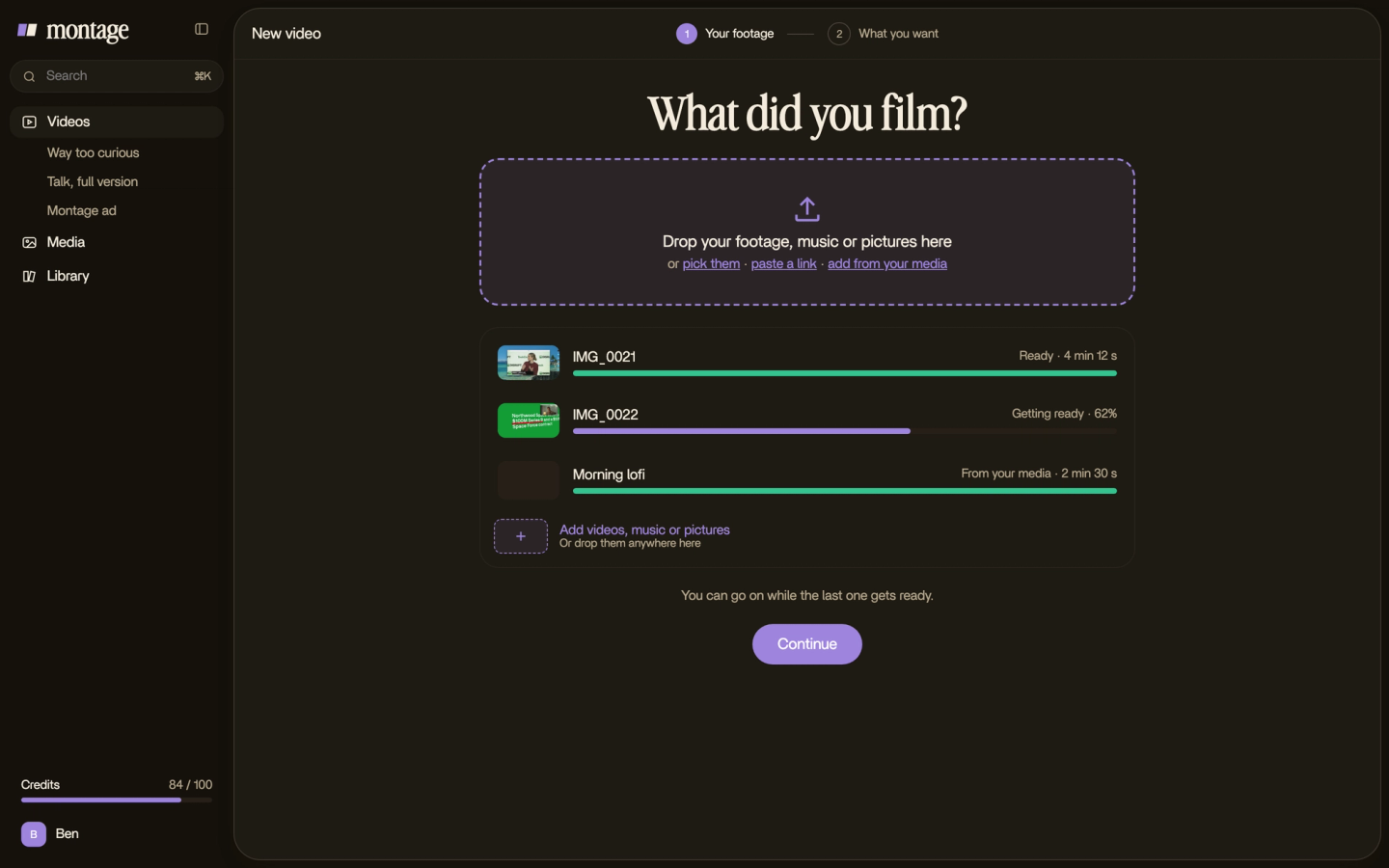
Then you say what you want, watch, and comment on the picture where something's off. You're not placing clips on a timeline. You're watching. So the specs that matter change order.
- The screen. You judge the edit and the color with your eyes. The labs' screen advice still holds.
- The storage. Your footage still sits on your computer.
- The battery. You'll watch, comment, and watch again.

I want to be honest here. I'm not telling you the laptop doesn't matter. It does: the screen, the storage, the battery. I have no measure of how fast Montage runs on one laptop or another, so I won't give you one. What changes is what you're paying for. More on a YouTube editor that runs in your browser.
A real YouTube video, start to finish.
So what does a real YouTube edit ask of a machine? Let me show you one.
From Disney star to space CEO is a 9:18 film. It started as seven takes, 33 minutes filmed on an iPhone. The finished video has 216 cuts. My face cam is a component, a macOS window over the James Webb images, on every one of those cuts. One media card is used 26 times. When the B-roll plays, the face cam moves to the corner.
 ComponentsMy face cam is a component: a macOS window over the James Webb images, on every one of the 216 cuts. Click to watch it.
 Reusable componentsOne media card, used 26 times: a picture or a clip, its caption, on the dark page. Click to watch it.
 B-rollGood Luck Charlie, Ready or Not, Billboard, the TODAY antenna: the face cam moves to the corner while each plays.
That's the kind of edit the guides size a big laptop for. It was made in Montage, by asking. Watch the 9:18 film, start to finish.
And color? That's where the screen earns its money, on either route.
 Color correctionTakes 4 to 7 were filmed flat: the NOMAD LUT on each, the first three left as they were. Same frame, split.
 Color correctionFilmed too dark on an iPhone. I asked for a grade, no LUT: Montage lifted it on its own. Same frame, split.
 Color correctionFilmed flat in Apple Log, my LUT on every shot. Same frame, split down the middle.
Takes 4 to 7 of that film were filmed flat, with the NOMAD LUT on each. Way too curious was filmed too dark on an iPhone, and Montage lifted it with a grade, no LUT. How to be creative was filmed in Apple Log, with my LUT on every shot. In every case, you decide if it looks right by looking at it. On a bad screen, you can't.
Side by side.
| Laptop | Best for | Not for | What the source says | Source |
|---|---|---|---|---|
| Apple MacBook Pro 16 (M5, 2026) | Daily editing, long videos | Tight budgets | Plenty of room for your timeline; RAM and SSD not replaceable | RTINGS |
| Apple MacBook Pro 14 (M5 Max) | Daily editing, 4K | Tight budgets | Best overall | Digital Camera World |
| Apple MacBook Air (M5) | Shorts, editing on the go | Long exports | Fanless; the 15-inch for the timeline; 24GB or 32GB of RAM | RTINGS |
| HP OMEN Transcend 14 (2024) | Windows, editing and gaming | A big screen | Mid-range pick; 32GB, as memory is soldered | RTINGS |
| ASUS TUF A16 | Starting on a budget | Quiet rooms | Budget pick; RAM and storage upgradable; hot and loud under load | RTINGS, Digital Camera World |
| Asus ProArt P16 | Windows editors | Mac users | Best Windows laptop | Digital Camera World |
Which one is for you?
Okay. Here's how I'd decide.
- You'll cut in Premiere Pro or Resolve every day, or you want a job as an editor or a colourist. Buy the MacBook Pro, with the RAM up front. Simple as that.
- You want one machine to edit and play games. The labs' mid-range and budget picks are gaming laptops already: the HP OMEN Transcend 14 and the ASUS TUF A16. Shotkit also says gaming laptops cross over to editing.
- You're starting on a budget, in a timeline program. The ASUS TUF A16, the one both labs agree on. Upgrade it later.
- You film yourself, run a channel, and would rather ask than cut. Try it on the laptop you have first. If you buy, buy for the screen, the storage and the battery. And see how long a YouTube edit really takes either way.
Sure. But it's not either-or. Montage exports the MP4, the sound only, or the cut for Premiere Pro or DaVinci Resolve. So you can start in the browser, and the bigger machine can come later, if you ever need it.

Questions about the best laptop for video editing YouTube.
What is the best laptop for video editing YouTube videos?
For a timeline program, both labs pick a MacBook Pro: RTINGS the 16-inch M5 (2026), Digital Camera World the 14-inch M5
Max. On a budget, both pick the ASUS TUF A16. If you edit in the browser, buy for the screen, the storage and the battery.
What's the best laptop for video editing YouTube under $1000?
I won't give you a price, they change daily. The budget pick of both labs is the ASUS TUF A16. Check its price the day you
buy.
What laptop do I need for 4K video editing?
Digital Camera World says 512GB of storage is a bare minimum for 4K, and 1TB is better. RTINGS picks the MacBook Pro 16
for heavy work.
Is a gaming laptop good for video editing and gaming?
Yes, according to the guides. RTINGS' mid-range and budget picks are both gaming laptops, and Shotkit says gaming
laptops cross over to editing.
Mac or Windows for editing YouTube videos?
Both work. The labs' best picks are Macs. Digital Camera World's best Windows pick is the Asus ProArt P16. On a Mac, buy
the RAM and storage up front: RTINGS says you can't upgrade them later.
What type of laptop is best for video editing?
A screen of at least 15 inches, IPS or OLED, pre-calibrated if you can (Digital Camera World). 16GB to 32GB of RAM for
large projects (Shotkit). And a mid-range graphics card will do fine (Digital Camera World). If you edit photos
too, the same screen advice applies.
What do most YouTubers use to edit their videos?
That's a question about software more than laptops. Here's what the big channels edit
with.
Which brand of laptop is best for video editing?
No source I read ranks brands. Apple tops both labs' best pick, and ASUS is both labs' budget pick.
See it in real videos.
Everything I showed here was made in real videos, each one asked for in words. Here they are.
 9:18
 2:07
 0:56
 0:38
That's it for this one. Now pick the way you'll edit, then pick the laptop.
See you in the next one.