Colour grader:
what one does, and which to use.
A colour grader is a person or a tool. Either way, the job is the same three steps. Here they are, on real footage, and which kind of grader fits yours.
 Ben, founder of Montage · · 7 min read
In this post7 parts
The short answer.
Let's start with the answer. A colour grader is the person, a colorist, or the tool that gives a video its color and its look. The job comes in three steps: correct the footage, match the shots, then grade.
One thing first. « Colour grader » and « color grader » mean the same thing. British spelling, American spelling. I'll write « color » from here on, like the rest of this site, except where I mean the search itself.
Now, here's the thing: when you search « colour grader », most of what Google shows you are free online tools. And most of them grade photos, not videos. If you came here with a video that looks flat or too dark, that's not what you need. Let me show you what is.
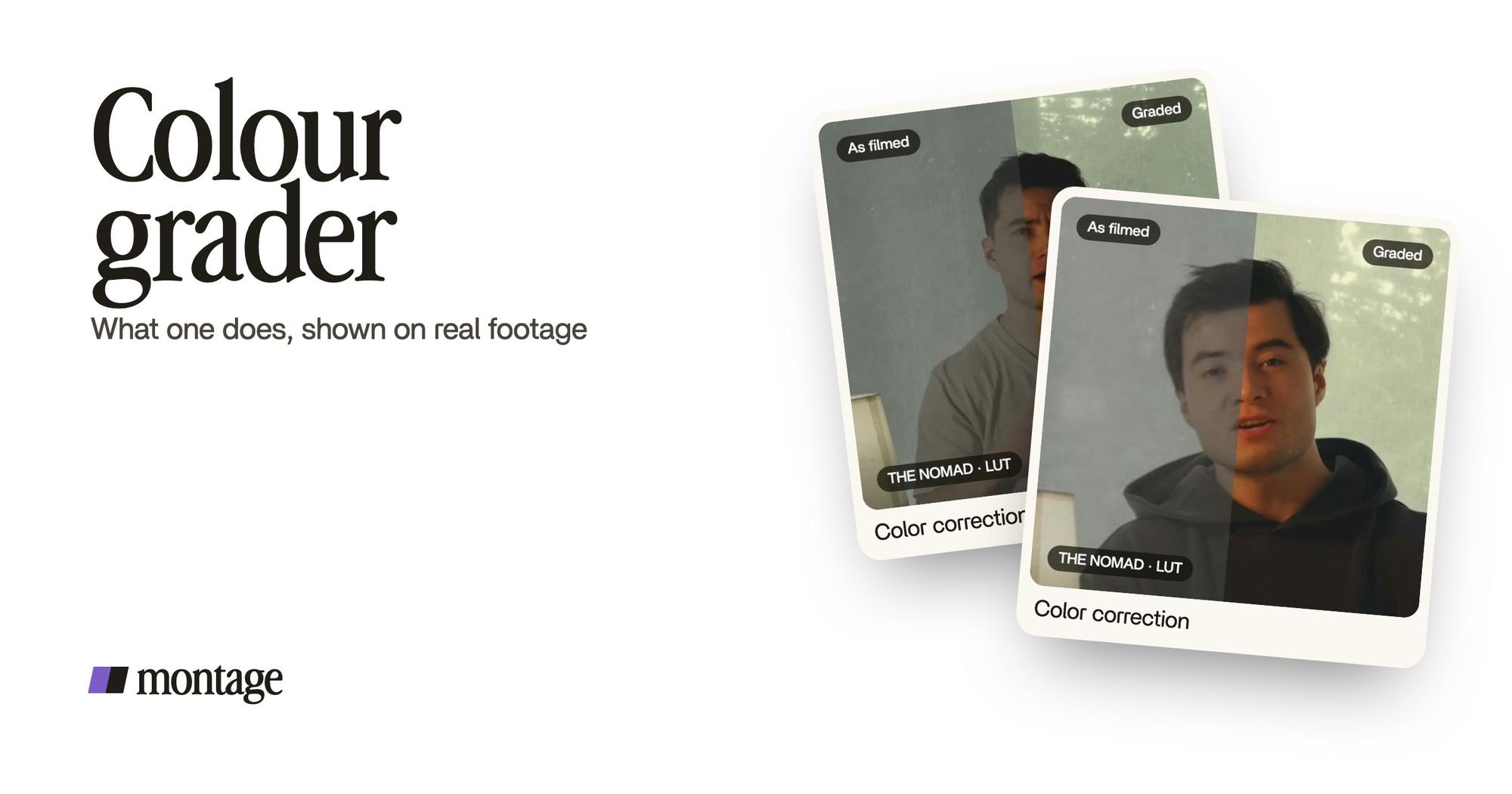
Here's a real example. From Disney star to space CEO was filmed in seven takes, and four of them were filmed flat. A color grader's first decision was which shots needed it.
 Color correction
Takes 4 to 7 got the NOMAD LUT. The first three were left as they were. Same frame, split. That's grading: deciding, shot by shot, so the whole thing looks like one video. If you want the bigger picture first, start with what color grading is.
What a colour grader does, step by step.
So what does a colour grader actually do? Let me explain.
1. Correct the footage
First, make it look right. Exposure, white balance, contrast. Not too dark, not too green, not too flat. That's video color correction, and it always comes first.
Why first? imageonline.io, the free grader at the top of Google, puts it well: a grade built over a color cast falls apart the moment the cast is fixed. Fix the problem, then make it pretty.
 Color correction
Way too curious was filmed too dark on an iPhone. I asked for a grade, no LUT, and Montage lifted it on its own. That was the whole job for the video filmed too dark. Correction, nothing fancy.
2. Match the shots
Then make every shot look like it belongs to the same video. Different takes, different light, different settings: side by side, they jump. A grader evens them out.
This is the step nobody shows. And it's the long one.
A grade is one decision. Matching the shots is a hundred.
In the long-form video with seven takes, that meant a LUT on four takes and nothing on the other three. Knowing what to leave alone is part of the job too.
3. Grade: give it a look
Now the fun part. The grade is the mood: warm, cold, punchy, soft. Wikipedia splits it in two. Primary grading moves the whole frame. Secondary grading moves one range of colors, or one area of the picture with a mask.
If you film flat on purpose, in HDR or Apple Log, the look often starts with a LUT: a file that turns flat footage into a finished color.
 Color correctionFilmed flat in HDR, the NOMAD LUT on every shot. Same frame, split.
 Color correctionFilmed flat in Apple Log, my LUT on every shot. Same frame, split down the middle.
Edit it all with AI was filmed flat in HDR, the NOMAD LUT on every shot. How to be creative was filmed flat in Apple Log, my LUT on every shot. Filming on an iPhone in Log? You'll want an Apple Log LUT.
And on a film? Per ScreenSkills' job profile, colorists work with the director and the director of photography to decide the palette. The look is a conversation, not a preset.
The four kinds of colour grader.
Okay. When people say « colour grader », they mean one of four things. Let's put them side by side.
| Free online grader | A program | A person (colorist) | An AI editor you ask in words | |
|---|---|---|---|---|
| Examples | imageonline.io, Higgsfield | DaVinci Resolve | A freelance or studio colorist | Montage |
| Video or photo | Photos only | Video | Video | Video |
| Price | Free | Free version; Studio $236 (Blackmagic's site, 2026-10-29) | Depends on the job and who does it | Plus $25, Pro $50, Max $100, Ultra $200 a month |
| How it works | Sliders, color wheels, presets | Wheels, curves, masks, by hand on every shot | You brief them, they grade, you review | You say the grade, look at the result, comment on the shot still off |
| Best for | Grading one photo, or finding a look on one frame | Anyone who wants to learn grading and full control | Films, series, client work on a calibrated monitor | Creators who film themselves and want the video out |
| Not for | A whole video | People who just want to post this week | A short you post on Tuesday | A feature film's final grade |
A word on the program row. DaVinci Resolve is what Blackmagic calls « Hollywood's Most Advanced Color Corrector », and the free version goes a long way. There are other color grading programs too.
And the last row? That's AI color grading: you describe what you want, in a sentence.


That's how color grading done by asking works in Montage: you watch, you comment at a moment or on a spot of the picture, then « Fix all ».
Is there a free colour grader?
Yes. But here's the catch nobody states.
The free graders on page one are photo tools. And the best of them says so itself: imageonline.io's advice for video is to export a frame, grade it there to find the look, and carry the settings across. Higgsfield grades images (PNG, JPG, WebP). Evoto, for photos, gives new users 3 free HD exports.
So what does that mean for your video? You grade one frame. Then you match every other shot by hand. Do you see the problem? That's step 2, matching the shots. The long one.
A free photo grader finds the look. It doesn't do the job.
For video, the free option is DaVinci Resolve's free version. It's a real tool. It also takes real time to learn.
One more thing. Higgsfield's own FAQ says filters apply a fixed, one-size-fits-all effect. That's the difference between a filter and a grade: a grade looks at each shot.
Do you need a colorist?
To be honest, it depends on what you're making.
For a film, a series, a client grade on a calibrated monitor? Yes. Hire one. That's a craft, and years of it show. And if you edit in Montage, you can export the cut for DaVinci Resolve, so a colorist can grade it there.
Sure. But for a creator posting several times a week? In my opinion, you don't need a person. You need the three steps done: correct, match, grade. And the hard part isn't the sliders. It's knowing what you want it to look like.
Color Grading Central, a site that sells grading courses and LUTs, makes the same point in its own way: the problem isn't the tools, it's a clear path from flat footage to a finished result.
Know the look you want. The rest is steps.
Colour grader: your questions.
What does a colour grader do?
A colour grader corrects the footage, matches the shots so they look like one video, then gives it a look. On a film,
they decide the palette with the director and the director of photography.
Is there a free colour grader?
Yes, for photos: imageonline.io and Higgsfield are free. For video, DaVinci Resolve has a free version. The free online
graders don't grade a whole video.
What's the best tool for color grading?
It depends on you. To learn grading and control every shot, DaVinci Resolve. For a film or client work, a colorist. To
get your own videos out without learning a program, an AI editor you ask in words, like Montage.
How much does it cost to get color graded?
It depends on the job and who does it. DaVinci Resolve is free, or $236 for Studio on Blackmagic's site. Montage's plans
are $25, $50 and $100 a month.
Is color grading really necessary?
Not on every shot. In From Disney star to space CEO, three of the seven takes were left as they were. Grade what needs
it.
See it on real footage.
Every grade in this article is a real frame of a real video, split down the middle. The four videos show what went in and how each one was made.
 9:18
 2:07
 0:56
 0:38
That's it for this one. Go look at your flattest shot.
See you in the next one.