Match cut:
what it is, the kinds, and how to make one.
A match cut joins two different shots through something they share. Here are the kinds, the famous ones from film, and how you'd plan one for your own video.
 Ben, founder of Montage · · 9 min read
In this post10 parts
The short answer.
Ladies and gentlemen, let's start with the answer. A match cut is a cut between two different shots that share something, a shape, a movement or a sound, so the change feels like one motion. A bone flies up, and it's a satellite in orbit. A match goes out, and it's sunrise over the desert.
A match cut is planned with the camera, and finished in the edit.
Below: the kinds, the famous ones, and how you'd plan one with a phone and an afternoon. For the jump cut question, here's match cut vs jump cut, compared side by side: a jump cut lets you see time skip, a match cut carries you across.
What a match cut is, really.
So what turns a cut into a match cut? Let me explain.
Wikipedia defines it as a cut from one shot to another in which the composition of the two shots is matched by the action or the subject. StudioBinder goes wider: « any transition, audio or visual, that uses elements from the previous scene to fluidly bring the viewer through to the next scene ».
So here's the test. A plain cut just goes to the next shot. A match cut goes there through something: what The Conversation calls « similarity in shape, colour or movement », or a sound that keeps going.
And it doesn't have to be a hard cut: StudioBinder notes a graphic match can be a straight cut or a dissolve. Of all the other kinds of video transitions, it's the one that takes the most planning.
The kinds of match cut, side by side.
Okay. StudioBinder names three kinds. Here they are, plus the match dissolve and one neighbor people mix up with them.
| Kind | What matches | Famous example | Source |
|---|---|---|---|
| Graphic match cut | A shape, a color or a composition, in the same place in the frame | 2001: A Space Odyssey: the bone becomes a satellite | Wikipedia, StudioBinder |
| Match on action | A movement, cut in the middle of it | The Graduate: Benjamin pulls himself onto a raft and lands somewhere else | StudioBinder |
| Sound bridge (audio match) | A sound, a line or music that carries across the cut | Mean Girls: the scream carries into the next scene | StudioBinder |
| Match dissolve | A shape held in place while one shot fades into the next | Citizen Kane: Kane's lit window stays in the same part of the frame | Wikipedia, StudioBinder |
| Eyeline match (related, not a match cut) | A look: someone looks off screen, the next shot shows what they see | Rear Window | Wikipedia |
The graphic match cut is the one most people mean: per Wikipedia, a conspicuous scene change, often a metaphor.
Match on action you'll see everywhere inside scenes: StudioBinder calls it « cutting on action », a pillar of continuity editing, cutting to a closer shot mid-move. That's a different job: it hides a cut inside one scene. It matters here for one trick the scene-to-scene match cut borrows from it: cut in the middle of the movement.
Match cut examples from famous films.
So which ones should you know? Here are the match cuts in movies every list names, with their sources.
| Film | From | To | Kind | Source |
|---|---|---|---|---|
| 2001: A Space Odyssey (1968) | A bone thrown in the air | A satellite in orbit | Graphic, and on action | Wikipedia, StudioBinder |
| Lawrence of Arabia (1962) | Lawrence and a lit match | Sunrise over the desert | Graphic (color), with sound | The Conversation, PremiumBeat |
| Psycho | Blood flowing down the drain | Marion's eye | Match dissolve | Wikipedia, StudioBinder |
| Citizen Kane (1941) | Kane's lit window | The same window, same spot, as the shots move around his estate | Match dissolve | Wikipedia |
| North by Northwest (1959) | Cary Grant pulls Eva Marie Saint up Mount Rushmore | Up into his train bunk | On action, skipping time | Wikipedia, newface.ai |
| Un Chien Andalou (1929) | A moon crossed by a cloud | An eye cut by a razor | Graphic, for shock | The Conversation |
| Apocalypse Now (1979) | A helicopter | The ceiling fan over Willard's bed | Sound | newface.ai |
| Saving Private Ryan (1998) | Waves at the cemetery | The Normandy beach | Sound bridge | The Conversation |
2001: The Conversation names the editor, Ray Lovejoy, and StudioBinder notes the cut lands « in the middle of the bone's rotation », so it's a match on action too. Lawrence of Arabia: the colors are « of a similar hue », and the film won the 1963 Academy Award for best editing (The Conversation). PremiumBeat adds that without the sound of the match blown out, the sunrise's silence wouldn't work as well.
It isn't only old films: the gallery on eyecannndy is full of ads and music videos (Nike SB, Apple Arcade, Delta).
Why a match cut works.
So why bother? Here's the thing: a match cut does one of three jobs.
- It skips time. North by Northwest skips the courtship and the marriage in one cut (Wikipedia).
- It carries a feeling. In Apocalypse Now, the helicopter becomes a ceiling fan, and you're in Willard's head.
- It makes a point. The bone becomes a satellite: two shots saying together what neither says alone.
The rule I'd keep, from newface.ai: a match cut is weak « when resemblance is arbitrary and the audience gains no new insight ». Honestly? With no reason, it's just a trick.
Same shape is the how. A reason is the why.
How to make a match cut.
You plan it before you film, film both shots with the thing in the same place and size, then cut mid-movement and line the two shots up.
1. Plan it: pick what carries across
The film ones need a crew. These don't. Here's how I'd try one, from the easiest:
- A look. You look off screen, the next shot shows what you see. Strictly, that's an eyeline match, the neighbor, but it's the gentlest way in.
- A gesture. Start a move in one place, finish it in another: run toward a door, come through the other side.
- A shape. Something round, then something round. A mug seen from above, then the moon, held in the same spot.
- A sound or a word. Start a word at the end of one scene and finish it in the next. If the word is on screen too, that's text that moves on screen doing the joining.
2. Film it: same place, same size
« Knowing how you will edit your video while you're shooting is key », says PremiumBeat. Their how-to lines every subject up on the center crosshairs, « the nose of each person », so the eyes don't bounce. On a phone, the grid does that job: same square, same distance, both times. Film the whole move, with room around it.
3. Cut it: mid-motion, then line it up
« The edit happens mid-motion », in PremiumBeat's words. Then line the two shots up: position, size, angle. Let the sound carry. In a timeline editor, PremiumBeat puts the second shot over the first, lowers its opacity, aligns the eyes, and brings the opacity back. If you like manual control, that works.
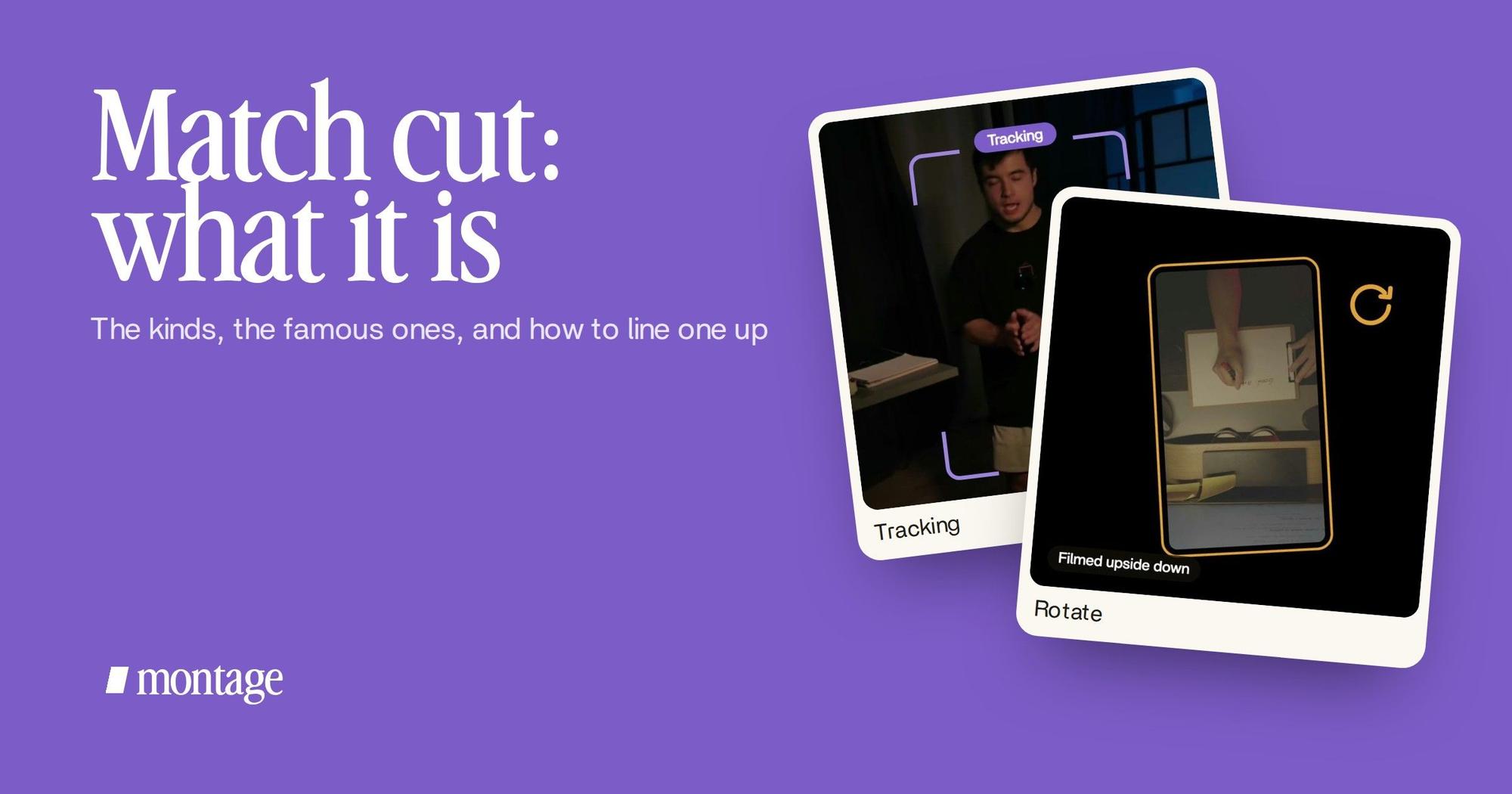
Here's that lining-up on a real video. Let's be clear: neither card is a match cut. It's the same kind of adjustment.
 TrackingLocked on me: Montage tracks me as I walk around the room.
 RotateThe notebook shots were filmed from above, upside down. Montage turned them the right way up.
In How to be creative, Montage tracks me as I walk around the room, so I stay in the same place in the frame: a frame that follows you, the crosshairs' job. The notebook shots, filmed upside down, were turned the right way up: turning an upside-down shot upright. Both are in the 2-minute video filmed in Apple Log.
Same shape, same place, mid-motion. That's the trick.
Making one without a timeline.
In Montage, you describe the cut: « cut from the mug to the moon in the middle of the swing, and move the moon so it sits where the mug was ». Then you watch it.
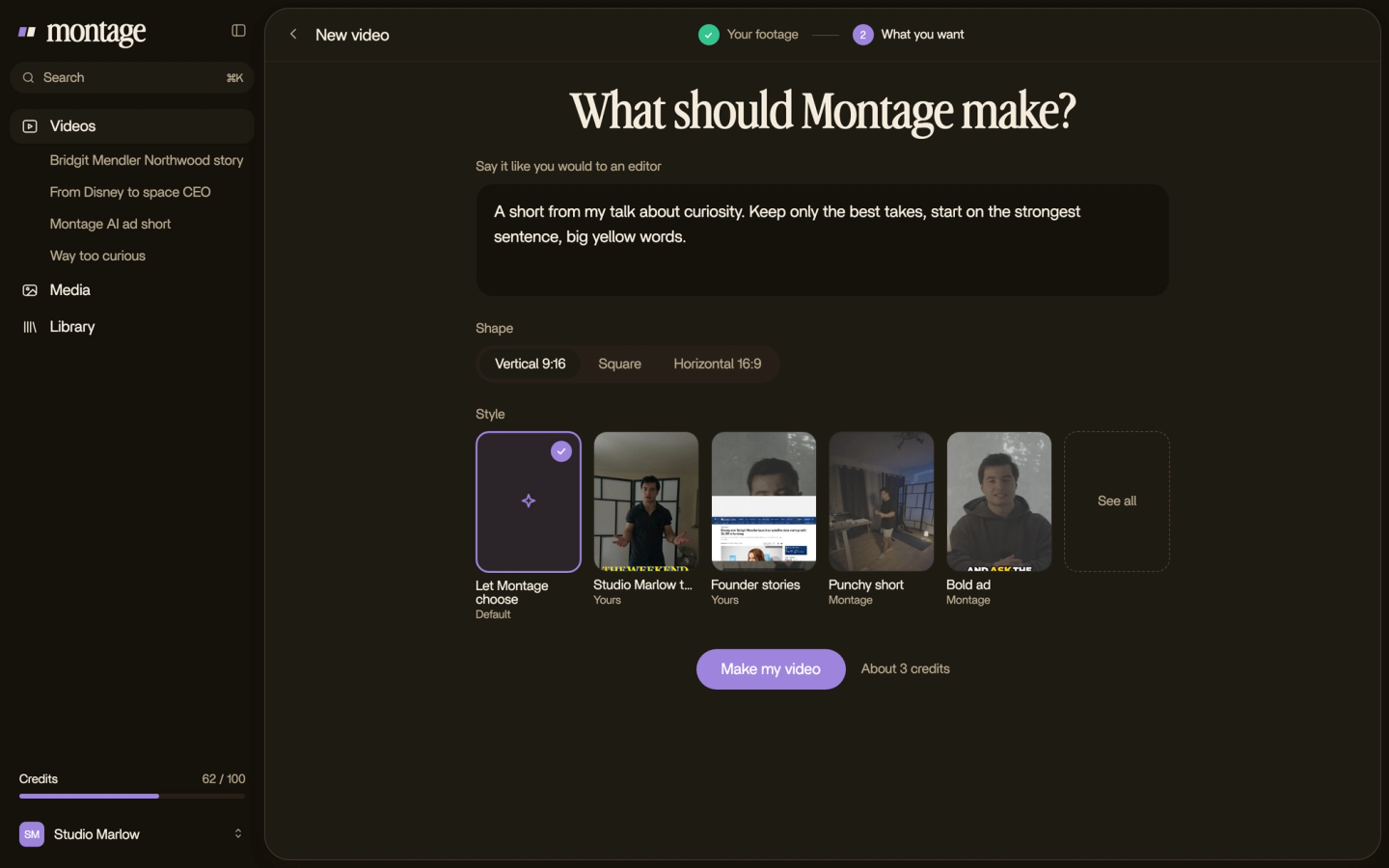
A few pixels off, or a frame late? Pause on that frame, click on the picture, say what's off. Then « Fix all ».
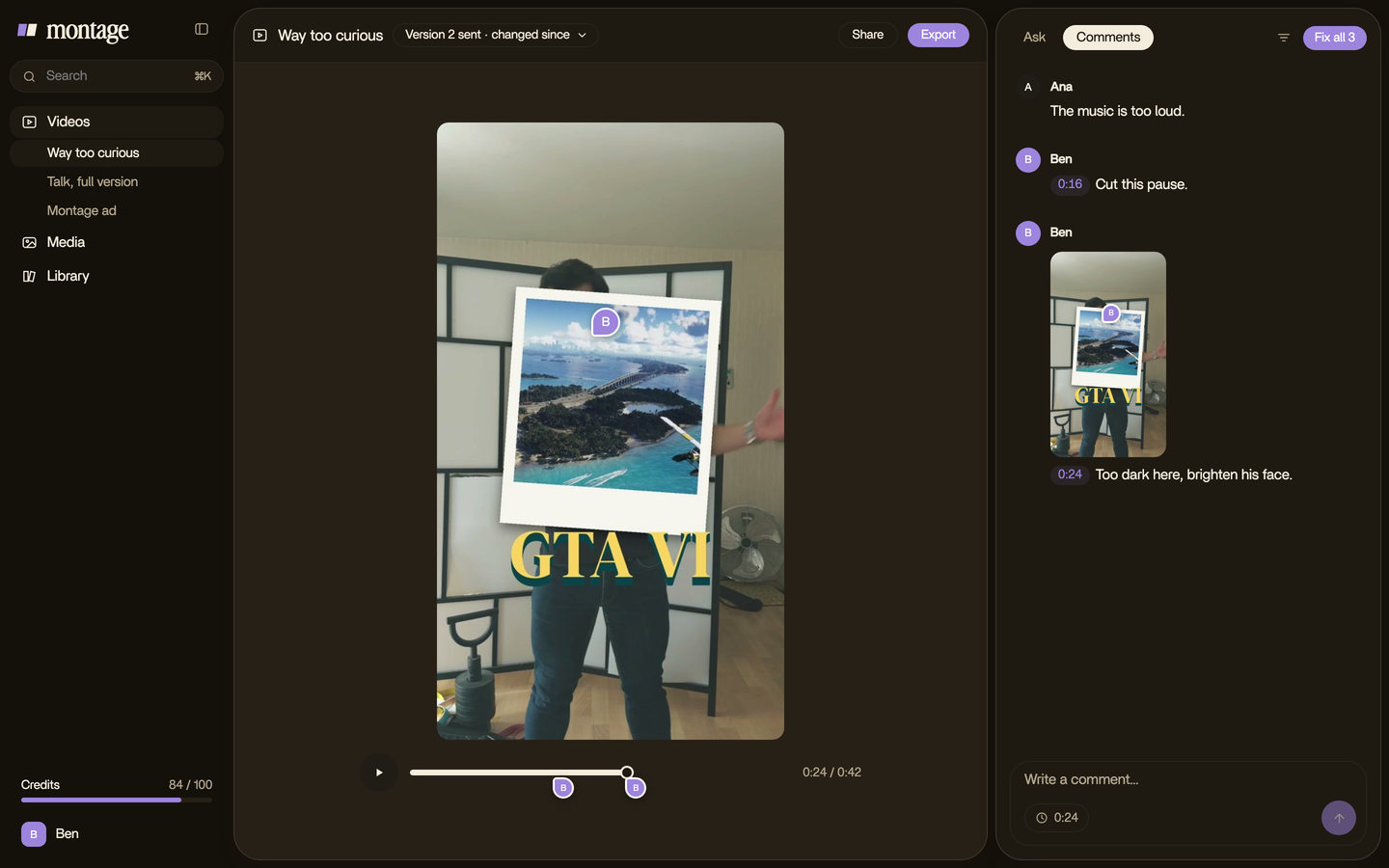
To be honest: Montage cuts where you ask, and moves, scales and zooms a shot (every setting of a clip). It won't film the second shot or plan the match. That stays yours. And don't expect the first try to land: that's what the comments are for.
That's the idea behind an AI video editor you talk to: you film, you say the cut.
Match cut vs jump cut, and the smash cut.
Each has its own page. A jump cut stays inside one shot and lets you see time skip: here's the jump cut on its own. A smash cut leaves the scene suddenly, to jolt you: the smash cut, the sudden one.
One bridge: keeping something in the same place across a cut is the match cut's trick, and it also keeps jump cuts smooth. In the comparison's real video, the face cam stays in the same window on all 216 cuts.
Match cut: your questions.
What is a match cut?
A cut between two different shots that share something: a shape, a movement or a sound. The shared thing carries your
eye across, like the bone that becomes a satellite in 2001: A Space Odyssey.
What are the types of match cut?
Three, per StudioBinder: the graphic match (a shape), the match on action (a movement) and the sound bridge (a sound).
The match dissolve is a graphic match done with a dissolve.
What is a graphic match cut?
A cut where a shape, a color or a composition sits in the same place in both shots, like 2001's bone and satellite.
What is the most famous match cut?
The bone in 2001: A Space Odyssey (1968), cut by Ray Lovejoy in the middle of the bone's rotation, to a satellite in
orbit.
Is the Psycho drain shot a match cut?
It's a match dissolve: the drain dissolves into Marion's eye. Wikipedia and StudioBinder both list it with the match
cuts.
What is an eyeline match?
Someone looks off screen, and the next shot shows what they see, as in Rear Window. A neighbor of the match cut, not one itself.
Can a match cut be just sound?
Yes. That's the sound bridge: in Saving Private Ryan, the sound of the waves carries from the cemetery to the beach.
See it in real videos.
No match cuts here. These are real videos, each edited by asking, to see the describe-and-comment way on actual footage.
 9:18
 2:07
 0:56
 0:38
To keep going with motion design, start with lower thirds, where motion design starts, then motion graphics for a YouTube video. And when you've filmed your two shots, Montage is free to start.
That's it for this one. Plan one match cut, film it twice, and line it up.
See you in the next one.